
You pay extra for residential proxies because they look like someone's home internet. To a website, a Vodafone IP in Berlin is just another customer.
That's also why IP reputation fails against them. GreyNoise found 78% of residential proxy sessions invisible to reputation feeds, across 4 billion sessions.
So I sent 798 browser sessions through residential exits in 8 countries, to a server I control. Free IP reputation flagged 7.
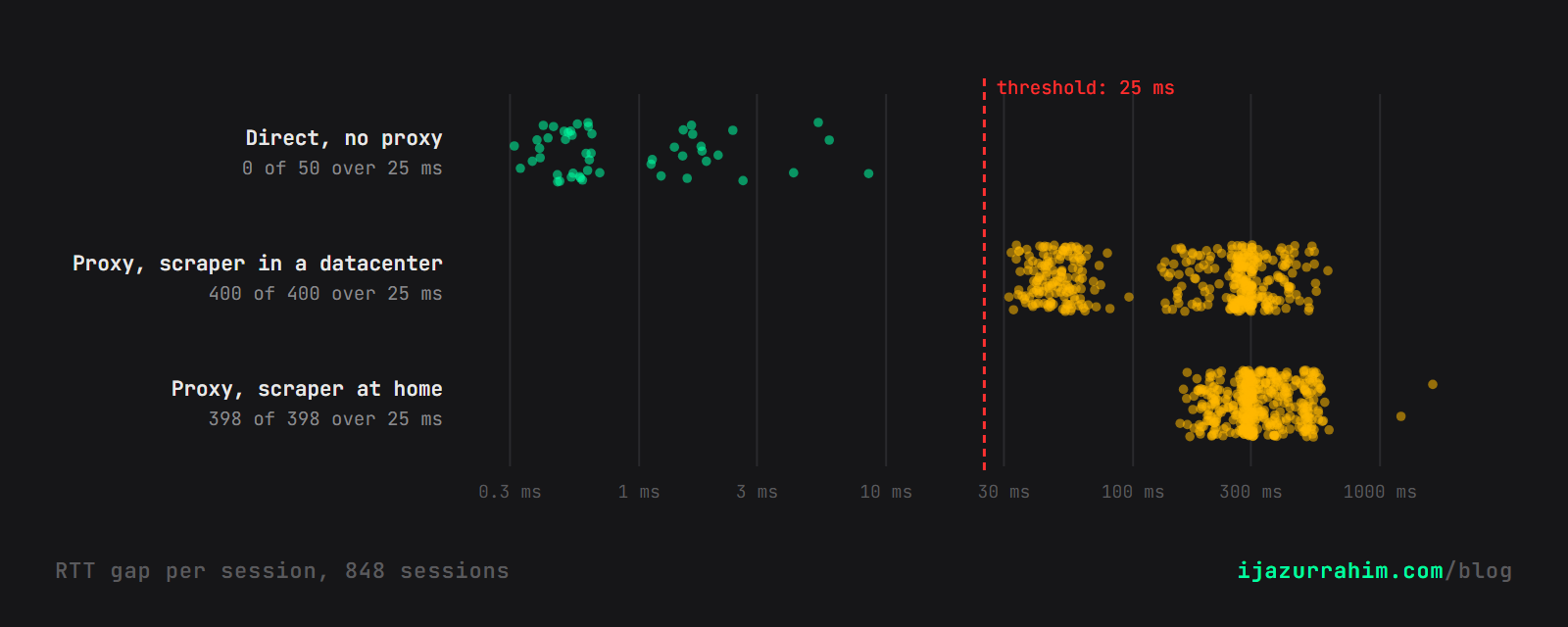
2 free checks on the server flagged all 798. The same checks flagged 0 of 50 direct visits from my own laptop.
The giveaway isn't the IP. The TCP connection comes from one machine, and the browser answering it is another.
A round trip gives the round trip away.
You can run the same check on your own connection: Is your connection proxied? It takes about 3 seconds.
| Check | What the server needs | Proxied, flagged | Direct, flagged |
|---|---|---|---|
| Free IP reputation | an ip-api lookup | 7 of 798 | 0 of 50 |
| TCP stack vs User-Agent | a SYN capture | 396 of 398 claiming Windows, 25 of 400 claiming Linux | 0 of 50 |
| RTT gap over 25 ms | the socket's RTT and 15 WebSocket echoes | 798 of 798 | 0 of 50 |
Why Can't a Residential Proxy Hide the Gap?
Your server can time 2 things for free.
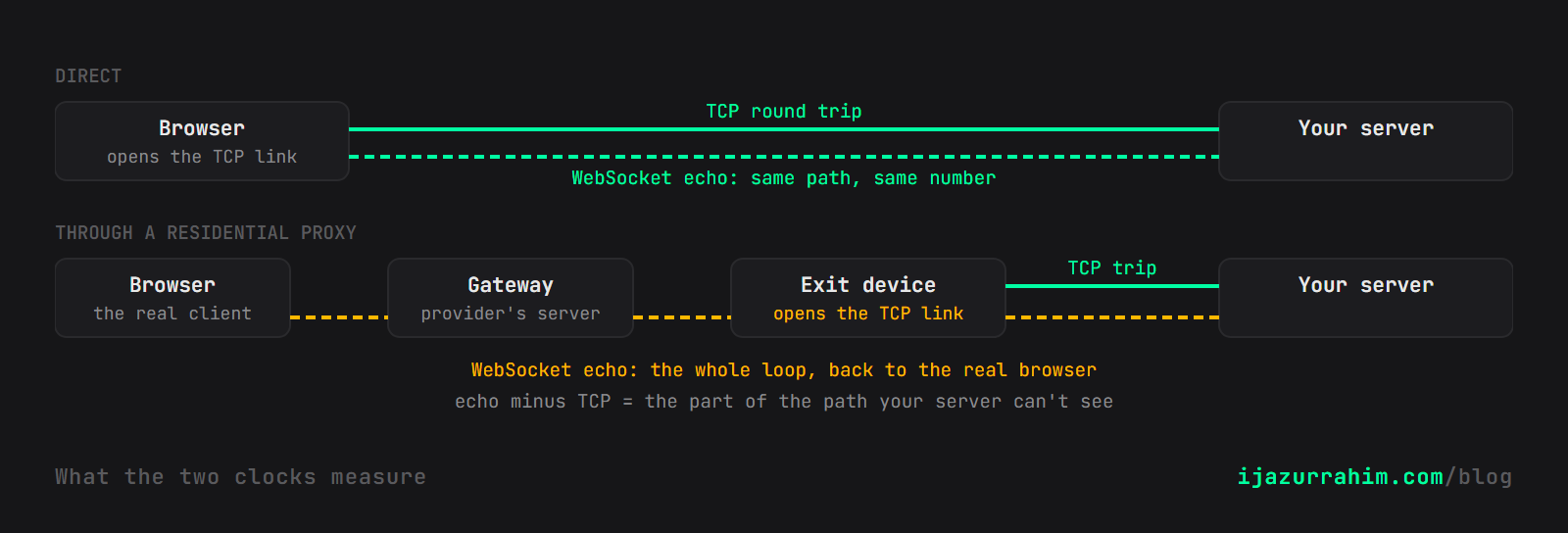
The first is the TCP round trip. The kernel measures it on every connection, and nginx exposes it as $tcpinfo_rtt.
The second is an echo: the server sends a WebSocket message and the page sends it straight back. The server times it.
For a direct visitor, both clocks measure the same path, so they agree. Mine agreed to within 0.6 ms on the median visit.
Through a proxy, they measure different paths. TCP ends at the exit device.
The echo keeps going, through the provider's gateway, to the real browser and back.
The client can't fake this. It can slow an echo down, but it can't speed one up.
A residential proxy rents you an address, not a location.
How Did I Test It?
- The target: a probe page on my own server, listening on port 443. The provider only tunnels to ports 80 and 443.
- The proxy: 1 of the large residential providers. It stays unnamed, because the result is about how these networks work, not about one vendor.
- The sessions: 8 countries, 50 sessions each, a fresh sticky session every time. 798 finished, on 796 distinct exits, all in the requested country.
- 2 scraper locations: Chrome on my Windows laptop at home, and Chrome on a European server next to the provider's gateway.
- The control: 50 sessions from the same laptop and browser, no proxy.
Nothing about the browser was patched or spoofed. This tests the network, not stealth plugins.
The exits looked like the real thing: Vodafone, Deutsche Telekom, Verizon, Orange, Reliance Jio. ip-api called 83 of them mobile connections.
What Does the Check Look Like in Code?
nginx already knows the TCP round trip. Pass it to your app with the peer's address:
location / {
    proxy_pass http://127.0.0.1:8504;
    proxy_http_version 1.1;
    proxy_set_header Upgrade $http_upgrade;
    proxy_set_header Connection "upgrade";
    proxy_set_header X-Peer-IP $remote_addr;
    proxy_set_header X-TCP-RTT $tcpinfo_rtt;   # microseconds
}
The page echoes whatever the server sends:
const ws = new WebSocket('wss://' + location.host + '/ws');
ws.onmessage = m => ws.send(m.data);
The server sends 15 numbered messages and keeps the fastest reply:
import asyncio, time
from aiohttp import web

async def ws_handler(request):
    tcp_rtt = int(request.headers["X-TCP-RTT"]) / 1000      # ms
    ws = web.WebSocketResponse()
    await ws.prepare(request)
    sent, echoes = {}, []

    async def read():
        async for msg in ws:
            if msg.data in sent:
                echoes.append((time.perf_counter() - sent.pop(msg.data)) * 1000)

    reader = asyncio.ensure_future(read())
    for i in range(15):
        sent[f"e{i}"] = time.perf_counter()
        await ws.send_str(f"e{i}")
        await asyncio.sleep(0.15)
    await asyncio.sleep(1)
    reader.cancel()
    gap = min(echoes) - tcp_rtt
    print("proxied" if gap > 25 else "direct", round(gap, 1))
    return ws
That's the whole trick. For production, compare minimum against minimum: ss -ti shows the kernel's minrtt for each connection.
I learned that the hard way. nginx's smoothed RTT runs high on congested exits, and 3 Indian sessions slipped under the threshold until I switched.
How Small Can the Gap Get?
The scraper's best case is a browser in a European datacenter, next to the proxy gateway, using exits in the same region.
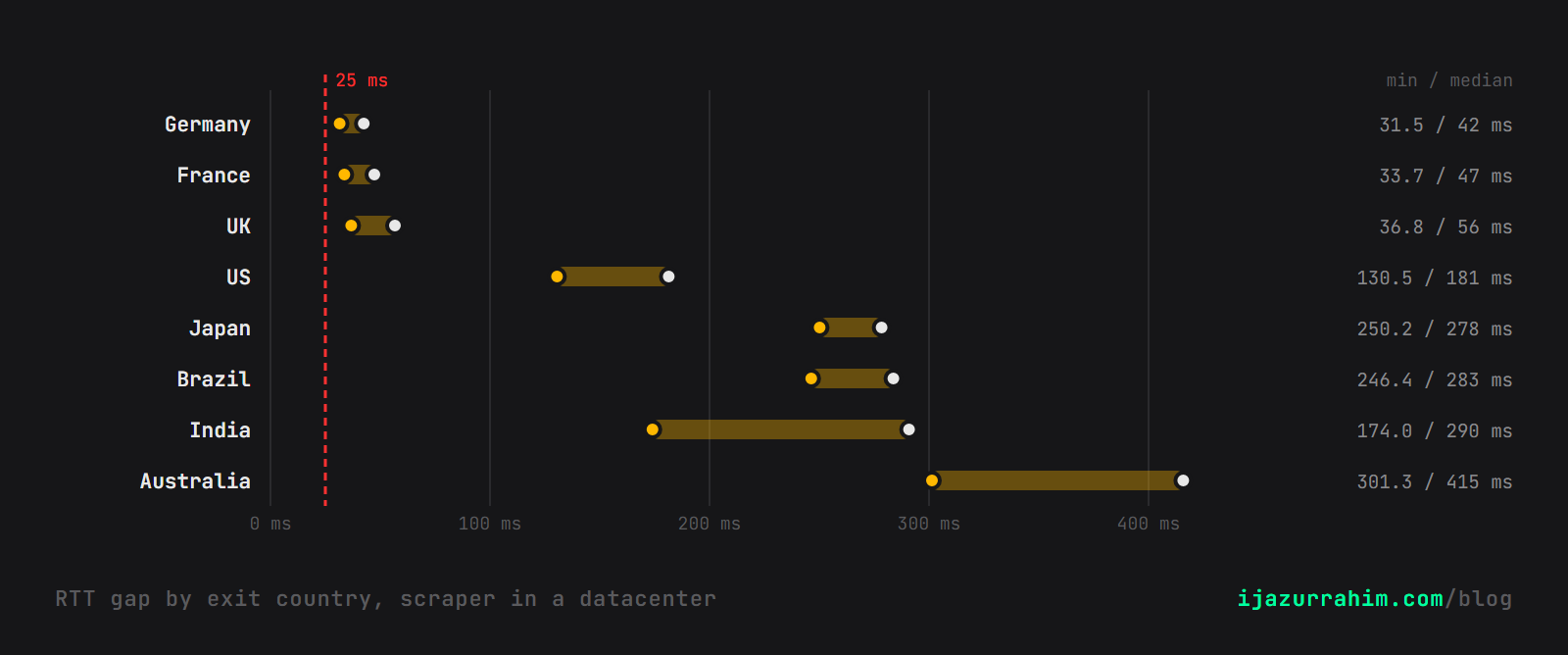
The closest exit still left a 31.5 ms gap. My noisiest direct visit came in at 8.5 ms.
That floor is the exit's own leg back to the gateway: a home line or a phone, plus the provider's backhaul.
The scraper can't move it.
The probe read that RTT from its own socket on port 443. An earlier run of 772 sessions behind nginx caught all 772 too.
From my laptop at home, the smallest gap was 155 ms. Far-away scrapers stand out further.
My control is 50 visits from 1 connection. Real users on bad Wi-Fi are noisier, so set the threshold from your own traffic.
Why Did the Stack Check Work Only Half the Time?
The first packet of every TCP connection carries the sender's operating system fingerprint: initial TTL, window size, option order.
Only 2 of the 798 exits had a Windows stack. 760 were Linux or Android, 11 Apple, 25 routers and other gear.
So a browser claiming Windows mismatched almost every time: 396 of 398 laptop sessions.
The datacenter Chrome honestly said Linux. Linux exits matched it, and the check caught only 25 of 400.
That makes the stack check a consistency test, not proxy detection. A scraper that claims Android passes it for free.
Why Did IP Reputation Miss 99%?
Because the exits are real homes. Blocking a Deutsche Telekom address blocks a Deutsche Telekom customer.
The pools also move faster than the lists. 796 of my 798 sessions got an address no other session used.
Some of those homes don't know they're in the pool.
The FBI seized NetNut in July. Krebs reports it was fed by a botnet of at least 2 million devices.
A block list can't tell a hijacked TV from its owner. Timing can, because it measures where the browser is, not whose IP it's using.
What Else Leaked?
2 more signals flagged every proxied session, but only because my browser was lazy.
- Time zone: my browsers said Asia/Karachi and UTC, while the exit IPs said Berlin, Tokyo or São Paulo.
- WebRTC: it handed the page the scraper's real public IP, because the proxy only carries TCP.
A careful scraper fixes both in 2 lines of config. Don't build detection on them.
The RTT gap is different. No browser setting changes where the browser is.
Can a Scraper Beat This?
Only by not using this kind of proxy.
The gap exists because the provider ends your TCP connection at the exit and opens a new one. That's how CONNECT proxies work.
A proxy that forwards raw packets, the way a VPN does, would close the gap. Then the stack fingerprint would be your own OS instead.
The other way out is running the browser on the residential device itself, as a remote browser. That's a different, pricier product.
It cuts both ways, too. Corporate proxies and privacy relays also end TCP early, so a real person behind one shows a gap.
Treat it as a strong signal, not a verdict.
Key Takeaways
- 2 free server-side checks flagged all 798 residential proxy sessions. Free IP reputation flagged 7.
- The RTT gap compares the TCP round trip with a WebSocket echo. Through a proxy, they measure different machines.
- Even the scraper's best case, a datacenter next to the gateway, left a 31.5 ms gap. My direct visits stayed under 9 ms.
- 2 of 798 exits ran Windows. A scraper claiming Windows almost always mismatches its own TCP stack.
- Time zone and WebRTC leaks are real but fixable. The gap isn't.
- Compare minimum echo time against the kernel's minimum RTT. Smoothed RTT misfires on congested exits.
- Use the gap as a strong signal, not a ban: corporate proxies and privacy relays show one too.
Every session went from my own machines, through a proxy account I pay for, to a page I wrote. No third-party site was probed.